
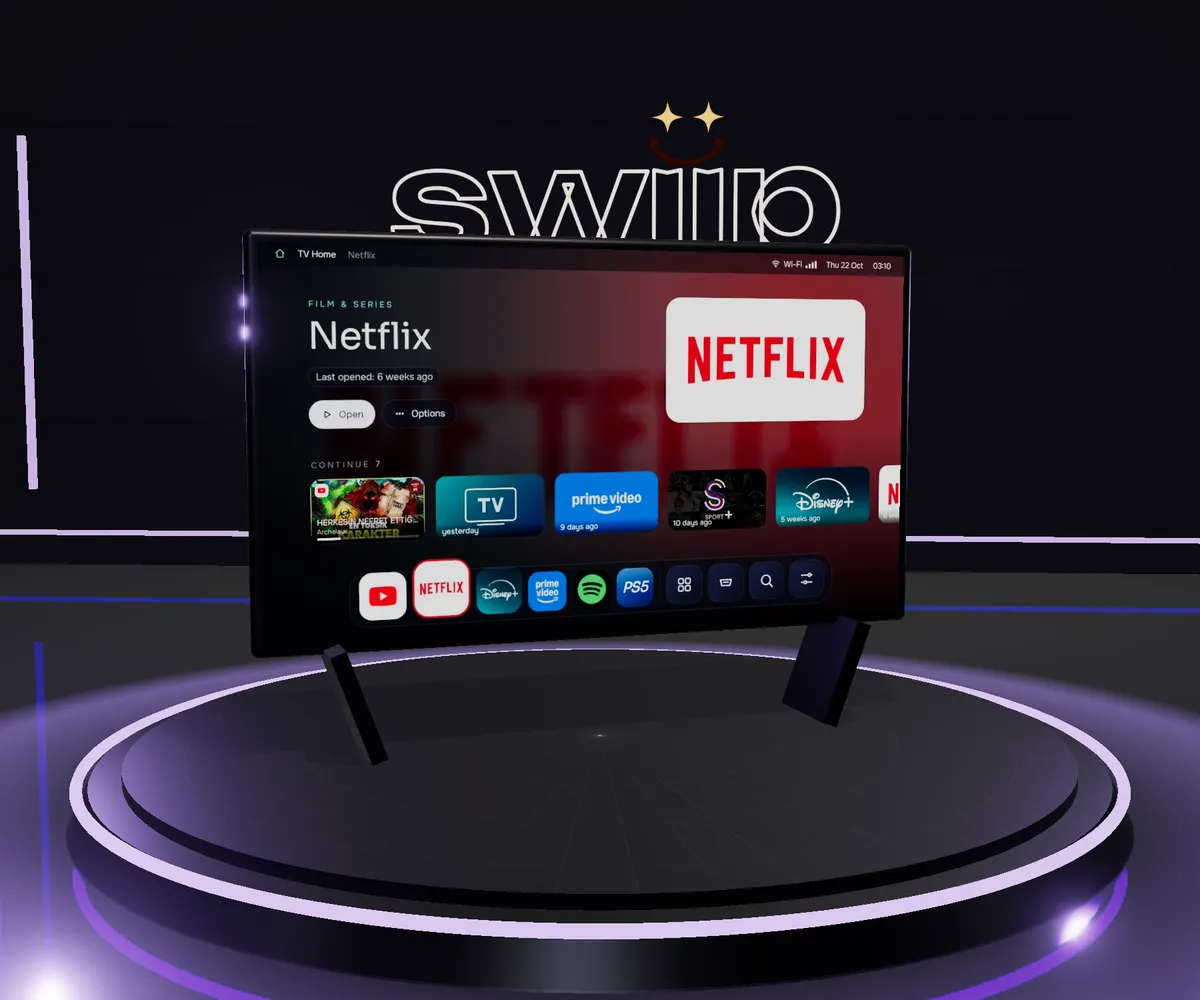


What it does
TV Home replaces the stock Google TV home screen with a fast, ad-free one in the style of macOS. A Dock along the bottom holds your favourite apps and TV inputs and magnifies as focus moves; the hero above it shows the focused app, and the whole screen takes on that app’s colours. A row of “continue watching” cards brings back the last YouTube video, Netflix episode, Prime film or Spotify song with its title, progress and artwork, and one press resumes it.
It comes with a one-command toolkit that talks to the TV over ADB: it backs up and disables (never uninstalls) the ambient mode, promoted-app installer, telemetry and other background services, caps background apps, compiles every app ahead of time, installs TV Home and makes it the home screen. Every change is reversible.
Key features
- macOS-style Dock with spring magnification; long-press OK on anything to add it, remove it or reorder it.
- Continue watching for YouTube, Netflix, Prime and Spotify, with in-video frames for YouTube and one-press resume.
- Launchpad that sorts every app into categories (Film & Series, Live TV & Sport, Music, Games, Browsers, Tools) and gives a new kind of app its own category when it is installed.
- HDMI-CEC devices listed by name with their brand badge, so a PS5 can be pinned to the Dock and switched to in one press.
- Spotlight search by typing or voice across apps, inputs and settings.
- Control Center with network, Bluetooth, volume, live RAM and storage, a Free RAM button, simple and detailed views, and an English / Türkçe switch.
- The phone as mouse and keyboard: a PIN-protected page on the TV’s address gives a touchpad, D-pad, media keys and live typing, with no app to install.
- A toolkit with one command per job: connect, debloat, restore, tune, compile, install, take over the home screen, sideload from official releases, mirror the screen.
How it’s built
The launcher is a single Kotlin app in Jetpack Compose and Compose for TV. MainActivity loads apps, inputs, system stats and watch history; AppRepository resolves every launchable app with its banner, extracts two colours from the artwork with AndroidX Palette and keeps a 32×18 copy of the banner for the backdrop. Categories classifies an app from its browser capability, then its declared category, then keywords in its package and label. TvSources reads TV inputs and replaces a bare HDMI port with the HDMI-CEC device behind it.
Google TV has no setting to change the home app, so TV Home declares HOME and an accessibility service, HomeWatcherService, brings it forward whenever the stock launcher’s home window comes to the front and when the TV wakes. The toolkit’s takeover command goes further: it disables the stock launcher and gives TV Home the android.app.role.HOME role, since a vendor app on the test TV also claims HOME.
Streaming apps on this TV no longer publish to the shared Watch Next list, but every player still exposes a media session. A notification-listener service (MediaListener) follows the active sessions and records title, channel, progress, artwork and a resume intent; for YouTube the video id is resolved once from the title so the cover and in-video frames can be fetched. The phone touchpad is a NanoHTTPD server with a WebSocket that only accepts the TV’s four-digit PIN; an accessibility service draws the cursor and performs the gestures and typing.
The test TV is a low-end SoC with 2.4 GB of RAM and a 32-bit userland, and its GPU fill rate is the bottleneck. Measured with the toolkit’s scripts, the median frame time while navigating went from 101 ms to 44 ms, janky frames from 100% to 25%, and free RAM from 676 MB to about 965 MB; the launcher itself uses about 49 MB.
Tech stack
- TV app
- Kotlin 2.2
- Jetpack Compose
- Compose for TV (tv-material)
- AndroidX Palette
- NanoHTTPD with WebSocket
- AGP 8.13
- R8
- Platform APIs
- NotificationListenerService and MediaSessionManager
- AccessibilityService
- TvInputManager (HDMI-CEC inputs)
- UsageStatsManager
- Watch Next provider
- Toolkit
- PowerShell (`tv.ps1`)
- Bash (`tv.sh`)
- ADB
- `cmd role`
- `pm disable-user`
- scrcpy
- Test TV
- Grundig Nano QLED, Google TV on Android 14
- MediaTek MT5896
- 2.4 GB RAM
- 32-bit userland
Engineering highlights
- A home screen Google TV will not hand over. TV Home declares
HOME, an accessibility service brings it forward whenever the stock launcher’s window appears, andtv takeoverdisables the stock launcher and takes theandroid.app.role.HOMErole.HomeWatcherService.kt,scripts/tv.sh - Continue watching without Watch Next. A notification listener follows every active media session and records title, artwork, progress and a resume intent; YouTube ids are resolved once from the title to fetch frames from inside the video.
WatchHistory.kt - Frame time from 101 to 44 ms on a 2.4 GB TV. No live blur: each backdrop is a 32×18 thumbnail stretched with bilinear filtering, painted once into its own layer and only cross-faded, and artwork follows focus only once it rests.
ui/DockHome.kt,AppRepository.kt - A held OK button that no longer clicks by itself. An IR signal can drop for a moment while a button is held, so a long-press menu read the hold as a new press; menus now ignore OK until it has been quiet for 350 ms.
ui/Theme.kt - HDMI devices by name. HDMI-CEC devices are child inputs of their port and empty ports report standby, so only named children count as connected, and a PlayStation shows up as PS5 with its badge.
TvSources.kt